Technical SEO
Technical SEO Services That Let Search Engines and AI Crawlers Reach, Read, and Index Your Pages
Technical SEO makes sure search engines and AI crawlers can reach, read, and index your pages. We fix robots.txt and firewall rules, server rendering, canonicals, redirects, sitemaps, internal links, and Core Web Vitals in priority order, then confirm indexing in Google Search Console and Bing Webmaster Tools every month.
- Published pricing from $799 per month
- No ranking guarantees
- Reply within 24 hours
Free, with no obligation
Get a free AI search review
Tell us where to reply. A strategist looks at how AI tools describe your business and replies within 24 hours.
This form needs JavaScript. Call +1 (510) 399-5523, email jd@aisearchrankings.com, or use the contact page.
Request received
Thank you. A strategist will reply within 24 hours, Monday to Friday, 9am to 6pm Pacific Time.
While you wait, you can take the free readiness check or compare the published packages.
We use your details only to reply. We never sell your information. Read our privacy policy.
Prefer to talk now? Call +1 (510) 399-5523.
The same work supports visibility across these AI search experiences
 ChatGPT
 Google AI Overviews
 Google AI Mode
 Perplexity
 Microsoft Copilot
 Grok
Grok
The platform mix and monitoring coverage are confirmed for your market during onboarding.
Key takeaways
- Technical SEO improves crawlability, indexing, Core Web Vitals, canonicals, and internal links.
- Google states AI Overviews link only to pages indexed in Google Search, and Microsoft states Copilot grounds answers through Bing search.
- Not every crawler runs JavaScript, so key content belongs in the HTML the server sends.
- A crawler with its own robots.txt group ignores your general rules, so private folders must be blocked again inside that group.
- ReachCrawlers are allowed in robots.txt and can get past your firewall.
- ReadKey content is present in the HTML the server sends.
- IndexPages are indexed in Google and Bing under the right canonical address.
- LoadPages load quickly and stay stable on a phone.
Each step depends on the one before it, so fixes are ordered the same way.
Client reviews
What clients say about working with AI Search Rankings
5.0 out of 5 on Google
-
I have worked with Jagdeep Singh, founder of AI Search Rankings, on Laser Tagging Inc., and the results have been excellent.
Jagdeep and his team built our website and completely improved how our business is positioned online. They understood our services, how customers search for us, where we were losing potential bookings, and what needed to change to turn more traffic into actual customers.
One of the biggest wins has been our visibility in AI search. Laser Tagging Inc. has become much easier to find and is now being recommended more often across ChatGPT, Google AI Overviews, Google Gemini, and Google Search.
The work has had a real impact on the business. We have generated more revenue, improved the customer journey, and fixed areas where we were previously losing customers and bookings.
What impressed me most about Jagdeep is his understanding of both traditional SEO and Answer Engine Optimization. He knows how to position a business so search engines and AI platforms can clearly understand what the company does, trust the information, and recommend it when people are looking for those services.
He is knowledgeable, detail-oriented, communicates clearly, and most importantly, follows through and gets the work done.
I am very happy with the results and highly recommend Jagdeep and AI Search Rankings to any business owner who wants to grow their visibility, become a recommended answer in AI search, and turn that visibility into real business and revenue.
-
Google Review:
I've worked with Jagdeep Singh, the founder of AI Search Rankings, on several projects, including Mr. Locksmith Lockout, Family Junk Removal Cleanout, and other businesses across different industries.
What sets Jagdeep apart is that he understands where search is heading. He doesn't just build websites or focus on traditional SEO. He brings real expertise in Answer Engine Optimization (AEO), helping businesses become easier for Google, Google Maps, ChatGPT, Google AI Overviews, Gemini, and other AI search engines to find, understand, trust, and recommend.
For my locksmith business, he took the time to understand our services, locations, and what customers actually need when searching for help. He and his team built our websites around those needs, with clear service information, local coverage, and easy ways for customers to call or text us.
What I appreciate most is that Jagdeep doesn't just give recommendations and leave the work to someone else. He deve
lops the strategy, handles the implementation, listens to feedback, and follows through. He understands that a website needs to do more than look good. It needs to help the business get found and turn visitors into customers.
After working with Jagdeep on multiple projects, I highly recommend AI Search Rankings to business owners looking for a knowledgeable, reliable partner in website development, SEO, and Answer Engine Optimization.
-
We hired AI Search Rankings to help improve our visibility in AI search, and we have been very happy with the experience. Jagdeep took the time to understand our business, explained everything in a way that was easy to understand, and showed us where we were missing opportunities.
They worked on our Answer Engine Optimization and helped improve how our business is presented and understood by platforms like ChatGPT and Google. What I appreciated most was that Jagdeep did not just give us recommendations. He actually helped us make the improvements and had a clear reason behind everything he recommended.
AI search was completely new to us when we started, but the whole process has been straightforward and easy to follow. I would definitely recommend AI Search Rankings to any business that wants to improve its online visibility and prepare for the way people are searching today.


Reviews from Google Maps, shown exactly as each client wrote them.
The crawl path
Every page passes four gates before it can appear anywhere
A page that fails an early gate never reaches the later ones, which is why the order of technical work matters more than the length of the audit.
- Found through your XML sitemap and internal links.
- Allowed by robots.txt and let through by your firewall and bot protection.
- Main content present in the HTML the server sends, not only after scripts run.
- Accepted under the right canonical address, with no noindex or blocking snippet rules.
Sources: Google Search Central: AI features and your website, Microsoft Learn: web search in Microsoft Copilot, RFC 9309: Robots Exclusion Protocol.
Want this done for your business?
Get a free review of where you stand today. A strategist replies within 24 hours.
Page experience
Core Web Vitals, measured the way Google measures them
Google measures page experience from real visits at the 75th percentile. These are the thresholds Google treats as good, and what usually breaks each one.
| Metric | What it measures | Good | Poor | What usually breaks it |
|---|---|---|---|---|
| Largest Contentful Paint | How quickly the main content loads. | 2.5 seconds or less | Over 4 seconds | Oversized hero images and slow server responses. |
| Interaction to Next Paint | How quickly the page responds to taps and clicks. | 200 milliseconds or less | Over 500 milliseconds | Heavy scripts and third party tags. |
| Cumulative Layout Shift | How much the layout jumps while loading. | 0.1 or less | Over 0.25 | Images, embeds, and banners without reserved space. |
How we fix a slow page
The same five steps on every template, starting from real visit data rather than a single lab test.
- Read field dataStart from real visit data in Search Console and the Chrome UX Report.
- Find the largest elementResize, compress, and prioritize the image or text block that loads last.
- Reserve spaceSet width and height on images, embeds, and banners so nothing jumps.
- Defer heavy scriptsLoad tags and widgets after the main content is usable.
- Recheck monthlyConfirm the change in field data, then watch for regressions.
Source: web.dev: Web Vitals thresholds.
See how AI tools describe your business
We check your most important buyer questions for free and show you the first fixes to make.
Migrations and launches
Most traffic losses happen on launch day, and most are preventable
Redesigns and platform moves change addresses, templates, and code at the same time. A redirect map written before launch keeps what your old pages earned.
Old address /services/roof-repair.htmlGoes to /roof-repair/301 permanentOld address /about-us.phpGoes to /about/301 permanentOld address /blog/storm-damage-tipsGoes to /guides/storm-damage/301 permanentOld address /specialsGoes to No redirect set404 not found
Planning a rebuild? See website redesign services and AI crawler policy.
Not sure where to start?
Tell us about your business, and we will point you to the few changes that matter most.
Checked against vendor documentation
Which AI crawlers to allow, and what each one controls
Each AI vendor publishes separate controls for search access and for model training. Checking them is the cheapest, fastest fix in AI search, and one wrong rule can hide your pages without any warning on your website.
Search and answer crawlers
GooglebotbingbotOAI-SearchBotChatGPT-UserPerplexityBotPerplexity-UserClaude-SearchBotClaude-User
Keep these allowed so your pages stay eligible for AI answers.
Model training controls
Google-ExtendedGPTBotClaudeBot
Allow or block these as a business decision. Each vendor documents them separately from its search crawler.
| AI product | Search access | Training control | What the training control changes |
|---|---|---|---|
| Google AI Overviews and AI Mode | Googlebot | Google-Extended | Google states that Google-Extended does not affect inclusion in Google Search and is not a ranking signal in Google Search. |
| Microsoft Copilot | bingbot | None listed | The cited documentation lists no separate training crawler. |
| ChatGPT | OAI-SearchBot | GPTBot | Blocking it tells OpenAI not to use your content for model training. Appearance in ChatGPT search is controlled separately by OAI-SearchBot. |
| Perplexity | PerplexityBot | None listed | The cited documentation lists no separate training crawler. |
| Claude | Claude-SearchBot | ClaudeBot | Anthropic states that blocking it excludes your future content from its model training datasets. |
What the documentation says
- Google states that a page must be indexed and eligible to show with a snippet in Google Search to appear as a supporting link in AI Overviews or AI Mode.
- Google states that no special schema, AI text file, or new machine readable file is required to appear in these features.
- The nosnippet, data-nosnippet, max-snippet, and noindex controls limit what Google can show, including in AI features.
- Clicks and impressions from AI features are included in the Search Console Performance report under the Web search type.
- Bing Webmaster Tools added an AI Performance report in public preview in February 2026. It shows how often your pages are cited in Microsoft Copilot and AI generated summaries in Bing.
- Bing supports IndexNow, which notifies Bing when a page is added, changed, or removed.
- OpenAI states that a robots.txt change can take about 24 hours to take effect.
- Perplexity publishes the IP ranges for both agents, so a server firewall can allow them without allowing everyone.
- Anthropic states that its crawlers honor robots.txt, including the Crawl-delay extension.
The rule most people miss. Under the robots.txt standard, a crawler obeys the most specific group that names it. If you add a group for one crawler, that crawler stops reading your "User-agent: *" rules, so any private folders you block there must be blocked again inside the new group.
# Search crawlers (Googlebot, bingbot, OAI-SearchBot,
# PerplexityBot, Claude-SearchBot) need no new group.
# They follow your "User-agent: *" rules unless a group
# names them. Remove any rule that blocks them.

# Opt out of OpenAI model training.
# ChatGPT search is controlled by OAI-SearchBot instead.
User-agent: GPTBot
Disallow: /

# Opt out of Anthropic model training.
User-agent: ClaudeBot
Disallow: /

# Opt out of Gemini training and Gemini Apps grounding.
# Google states this does not affect Google Search.
User-agent: Google-Extended
Disallow: /
Test changes in Google Search Console and Bing Webmaster Tools after you publish them.
Sources, checked September 13, 2026: Google Search Central: AI features and your website, Google common crawlers: Google-Extended, Microsoft Learn: web search in Microsoft Copilot, Bing Webmaster Blog: AI Performance public preview, OpenAI crawler documentation, Perplexity crawler documentation, Anthropic crawler documentation, RFC 9309: Robots Exclusion Protocol.
Not sure what your website allows AI crawlers to do?
Ask for a free review, and we will look at your robots.txt file and tell you whether it blocks the crawlers listed above.
Free self check, about 2 minutes
Technical SEO readiness check
Answer eight questions about how search engines and AI crawlers reach your website. Every later improvement depends on these.
Your result
Your fixes, in priority order
Every item is in place. Keep checking these each quarter, because vendors change their crawlers and your website changes over time.
Your answers are used only to show your score. With JavaScript on, they stay in this browser tab and are sent only if you include them in the request form.
Proof with its limits attached
Documented results, labeled honestly
Each result states what was measured, where the data came from, and what it does not prove. Past results show what the approach can do. They do not guarantee your outcome.
-
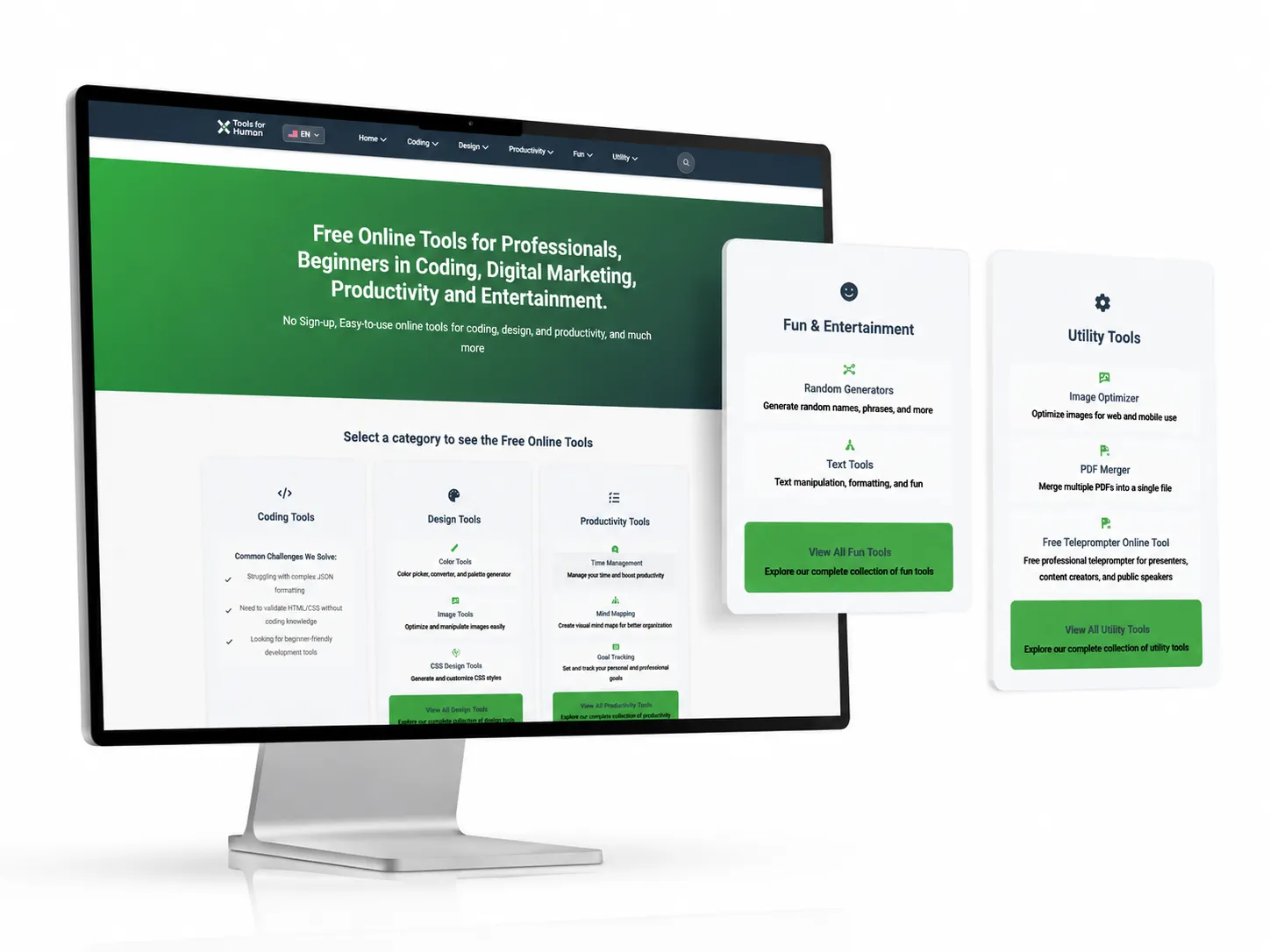

Measured on Microsoft Copilot
Verified result
26,300Microsoft Copilot citations
Toolsforhuman.com Microsoft Copilot
AI Search Rankings used schema-first Answer Engine Optimization, layered JSON-LD, robust canonicals, and multilingual hreflang to help Toolsforhuman.com earn 26,300 Microsoft Copilot citations across 160 plus pages, including Spanish-language pages, in a sample window of about three months.
Limitation. The result applies to the documented sample window and does not guarantee future citations.
-
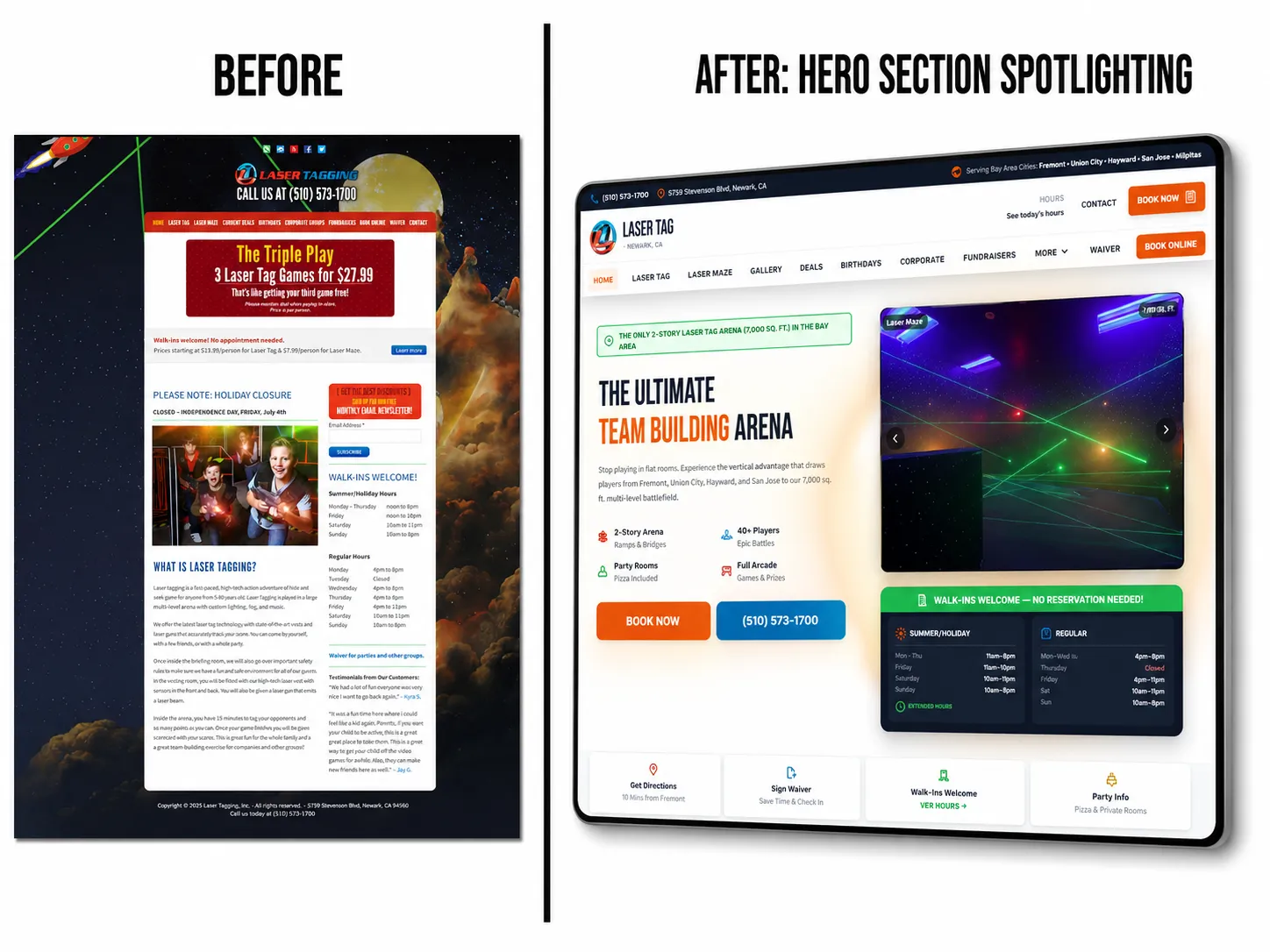

Measured on Google AI Overviews and AI Mode
Client-reported private Google Search Console result
4,460Google generative AI impressions
Laser Tagging Inc. Google AI Overviews and AI Mode
AI Search Rankings rebuilt the Laser Tagging Inc. digital brand and website, expanded its service-area relevance across Newark, Fremont, San Jose, and nearby Bay Area communities, and documented 4,460 client-reported Google generative AI impressions in the selected last-three-month window.
Limitation. The report measures Google generative AI impressions. It does not prove a ChatGPT recommendation, a click, a booking, a lead, or revenue.
Newer data shared by the client: a Google Search performance export for search type Web shows 6,109 impressions in the last 3 months as of September 13, 2026, compared with 947 in the previous 3 months. That total covers all Google web results, not only AI features. Checked September 13, 2026. Open the search performance export shared by Laser Tagging Inc. (opens in a new tab)
Read the Laser Tagging Inc. case studyView the Laser Tagging Inc. project
How AI Search Rankings labels and measures results
Start with your own baseline
Every engagement starts with a measured baseline. Ask for a free review and see where your business stands today.
Why AI Search Rankings
Why businesses choose us for Technical SEO
Senior expertise, published prices, and honest reporting from the first conversation. This is what partnering with us looks like.
Led by a named expert
Jagdeep Singh, Founder and Lead Answer Engine Optimization Strategist, brings 12+ years of SEO and digital marketing experience and 9 Google Skills certifications you can verify.
Prices published before you call
Three monthly packages at $799, $1,500, and $3,500, each with a written list of the work delivered every month.
Reports you can check yourself
We record the real AI answers for your buyer questions and list the work shipped beside them, never invented rankings.
Proof with its limits stated
Results such as 26,300 Microsoft Copilot citations for Toolsforhuman.com are published with how they were measured and what they do not prove.
Honest about what no one controls
We guarantee the work, not rankings or citations, so you are never sold a promise that cannot be kept.
A fast, straight answer
A strategist replies within 24 hours, Monday to Friday, and tells you plainly when we are not the right fit.
Ready to work with a team that shows its work?
Start with a free review and a clear, published scope, with no obligation.
Published pricing
What Technical SEO costs, and which scope fits you
Every price is a fixed monthly scope of work. It is never a promise about rankings or AI citations, because other companies control those systems.
Technical SEO is included from Local AI Answer Growth at $1,500 per month, and in every higher package.
Local or service-area business
Three published monthly packages, built around local and service-area businesses. Each one lists exactly what is delivered every month.
-
Local small businesses
Local AI Answer Starter
$799 per month
Help nearby customers find, trust, and choose your business across Google, Google Maps, and AI answers.
- Local buyer prompts tracked
- 25
- Local competitors compared
- 3
- Page optimized monthly
- 1
- New local answers monthly
- 3 to 5
-
Growing local businesses
Local AI Answer Growth
$1,500 per month
Win more calls, bookings, and quote requests across Google, Google Maps, and AI answer engines.
- Local buyer prompts tracked
- 50 to 75
- Local competitors compared
- 5
- Pages optimized monthly
- 2 to 3
- New local answers monthly
- 5 to 10
-
Competitive & multi-location businesses
Local AI Answer Authority
$3,500 per month
Build a complete local authority system across Google, Maps, AI answers, reviews, and content.
- Local buyer prompts tracked
- 150 to 250
- Local competitors compared
- 10
- Pages optimized monthly
- 5 to 8
- New local answers monthly
- 10 to 20
Not sure which package fits? Answer four questions in the AI Search Fit Check, or compare every package line by line.
National, B2B, SaaS, or online business
Our three published packages were built around local and service-area businesses, which is why their names say Local. National, B2B, SaaS, and online businesses are also served, and the work itself is the same: buyer questions tracked, pages improved, facts corrected, and results reported.
What changes is what the questions and pages cover, such as products, categories, comparisons, and several markets. Start with the free package fit review. We compare your buyer questions, pages, and competitors against the published scopes and confirm in writing whether one of them fits before any work starts.
Request a free package fit reviewStraight answers
Technical SEO questions, answered
Plain answers to the questions buyers ask most. If yours is not here, ask a strategist directly.
What is technical SEO?
Technical SEO is the work that lets search engines and AI crawlers reach, read, and index your pages. It covers robots.txt and firewall rules, server rendering, canonical tags, redirects, XML sitemaps, internal links, mobile usability, and page speed measured by Core Web Vitals.
Does technical SEO affect Google AI Overviews?
Yes. Google states that a page must be indexed and eligible to show with a snippet to appear as a supporting link in AI Overviews or AI Mode. Indexing problems, noindex tags, and restrictive snippet controls remove pages from consideration before content quality is ever judged.
Why does Bing indexing matter if most of our traffic comes from Google?
Microsoft states that Copilot grounds its web answers through Bing search, so a page missing from the Bing index cannot support a Copilot answer. We verify your site in Bing Webmaster Tools and confirm which key pages Bing has actually indexed.
Do AI crawlers run JavaScript?
Not reliably. Google renders JavaScript, but not every crawler does. If your main content, prices, or answers appear only after scripts run, some AI tools may never see them, so we make sure key content is present in the HTML the server sends.
What are Core Web Vitals, and what scores count as good?
Core Web Vitals are Google's measures of loading, responsiveness, and visual stability. Google treats a Largest Contentful Paint of 2.5 seconds or less, an Interaction to Next Paint of 200 milliseconds or less, and a Cumulative Layout Shift of 0.1 or less as good, measured at the 75th percentile of real visits.
Why can adding AI crawler rules expose private folders?
Under the robots.txt standard, a crawler that finds a group naming it follows only that group and ignores the rules written for all crawlers. If you add a group for an AI crawler and do not repeat your private Disallow lines inside it, that crawler is allowed into folders you meant to block.
We redesigned our website and traffic dropped. Can you find out why?
Usually, yes. The most common causes are missing redirects from old addresses, changed canonical tags, pages accidentally set to noindex, and content that now loads only through scripts. We compare the old and new addresses, check what search engines indexed before and after, and fix the gaps in order of lost traffic.
Do you only audit, or do you fix the problems?
We fix what your package scope covers and what our access allows, such as robots.txt, redirects, canonical tags, sitemaps, structured data, and content templates. Changes that need your developer or hosting provider are written as exact instructions and checked after they ship.
How often do you check technical health?
Every month. Crawling, indexing, redirects, and Core Web Vitals are rechecked on a fixed schedule, and a website, plugin, or hosting change is checked when it happens, because a single update can remove pages from search without a visible error.
How much do technical SEO services cost?
Technical SEO is included in every package at $799, $1,500, or $3,500 per month. Larger websites, JavaScript frameworks, and migrations usually need the $1,500 or $3,500 package for the depth of work involved.
Free, with no obligation
Find out what search engines and AI crawlers can reach
Choose what you need help with and tell us where to reply. We check crawling, indexing, and rendering on your key pages and respond within 24 hours.
What happens after you send it
- We review your website and the answers AI tools give for your buyer questions.
- A strategist replies within 24 hours, Monday to Friday, 9am to 6pm Pacific Time.
- You get a clear recommendation, including when we are not the right fit.
Prefer to talk now?
This request form needs JavaScript. You can still reach a strategist by phone, text, or email using the links beside this form, or use the contact page.
Request received
Thank you. A strategist will reply within 24 hours, Monday to Friday, 9am to 6pm Pacific Time. A confirmation email is on its way.
While you wait, you can run the free AI visibility audit or compare the published packages.
We use your details only to reply to this request. There is no obligation, and we never sell your information. Read our privacy policy.